


That's why performance testing has become an essential part of modern software development. It helps engineering teams validate how applications behave before real users experience slowdowns, crashes, or unexpected failures.
In this blog, you'll learn the different types of performance testing, when to use each one, the metrics that matter most, common mistakes to avoid, and how engineering teams can build applications that remain fast, reliable, and scalable under real-world conditions.
Whether you're a QA engineer, SDET, software developer, engineering manager, or DevOps professional, this blog will help you select the right testing strategy before performance issues reach production.
What Is Performance Testing?
Performance testing is a non-functional testing practice that evaluates how an application performs under different workloads, user traffic, and operating conditions. Instead of verifying whether a feature works correctly, performance testing measures how efficiently, reliably, and consistently the system responds when users interact with it.
Its primary objective is to determine whether an application can meet predefined performance expectations while maintaining stability, scalability, and responsiveness.
Performance testing examines the complete technology stack, including application servers, APIs, databases, network components, third-party integrations, caching layers, and cloud infrastructure. By identifying bottlenecks early, teams can optimize performance before users encounter slow response times or outages.
Modern engineering teams integrate performance testing into CI/CD pipelines, so every significant release is validated before reaching production. This shift-left approach reduces production risks, minimizes costly post-release fixes, and improves overall software quality.
Why Is Performance Testing Important?
As applications become more distributed, cloud-native, and API-driven, performance failures have become more complex and more expensive.
A feature-rich application offers little value if users abandon it because it loads slowly or becomes unavailable during peak traffic.
Performance testing helps teams answer an important question:
"Will our application continue delivering a great user experience as demand grows?"
Without performance testing, organizations often rely on assumptions instead of data when making infrastructure and releasing decisions.
A well-planned performance testing strategy helps teams:
- Prevent Performance Bottlenecks
- Improve User Experience
- Validate Scalability
- Reduce Infrastructure Costs
- Minimize Production Risks
What Metrics Should You Measure During Performance Testing?
Running a performance test is only half of the process. Equally important is understanding the performance metrics that reveal how your application behaves under load.
The following performance testing metrics provide the clearest picture of application health and are commonly used to evaluate test success.
| Metric | Why It Matters | Typical Industry Benchmark* |
|---|---|---|
| Response Time | Measures how long the application takes to respond to user requests. | < 2 seconds for web pages; < 500 ms for APIs |
| Latency | Indicates the delay before data transfer begins after a request is sent. | < 100 ms for interactive applications |
| Throughput | Shows the number of requests or transactions processed during a given period. | Should consistently meet or exceed expected peak business traffic |
| Transactions Per Second (TPS) | Measures how many business transactions the system completes each second. | Depends on workload; validate against expected production TPS |
| Concurrent Users | Represents the number of active users interacting with the application simultaneously. | Should support expected peak concurrent users with no SLA violations |
| Error Rate | Tracks failed requests during testing and identifies reliability issues. | < 1% during normal load; 0% for critical business transactions |
| CPU Utilization | Indicates whether servers are approaching processing limits. | 60–80% sustained utilization under peak load |
| Memory Usage | Helps identify memory leaks and inefficient resource consumption. | Stable usage with no continuous upward trend during long-running tests |
| Disk I/O | Measures how efficient storage systems handle read and write operations. | Minimal queue length and < 80% sustained disk utilization |
| Network Utilization | Detects bandwidth limitations and network bottlenecks. | Generally, < 70–80% sustained bandwidth utilization |
Note: These benchmarks are general industry guidelines rather than fixed standards. Acceptable performance thresholds vary based on your application architecture, business requirements, user expectations, and Service Level Objectives (SLOs). Define performance targets before testing and validate them against production workloads.
Rather than focusing on a single metric, engineering teams analyze these metrics together to understand overall system performance and identify the root cause of performance degradation.
Best Practice: Define Service Level Objectives (SLOs) and performance acceptance criteria before executing any performance test. This makes it easier to determine whether the application meets business expectations.
What Are the Different Types of Performance Testing?
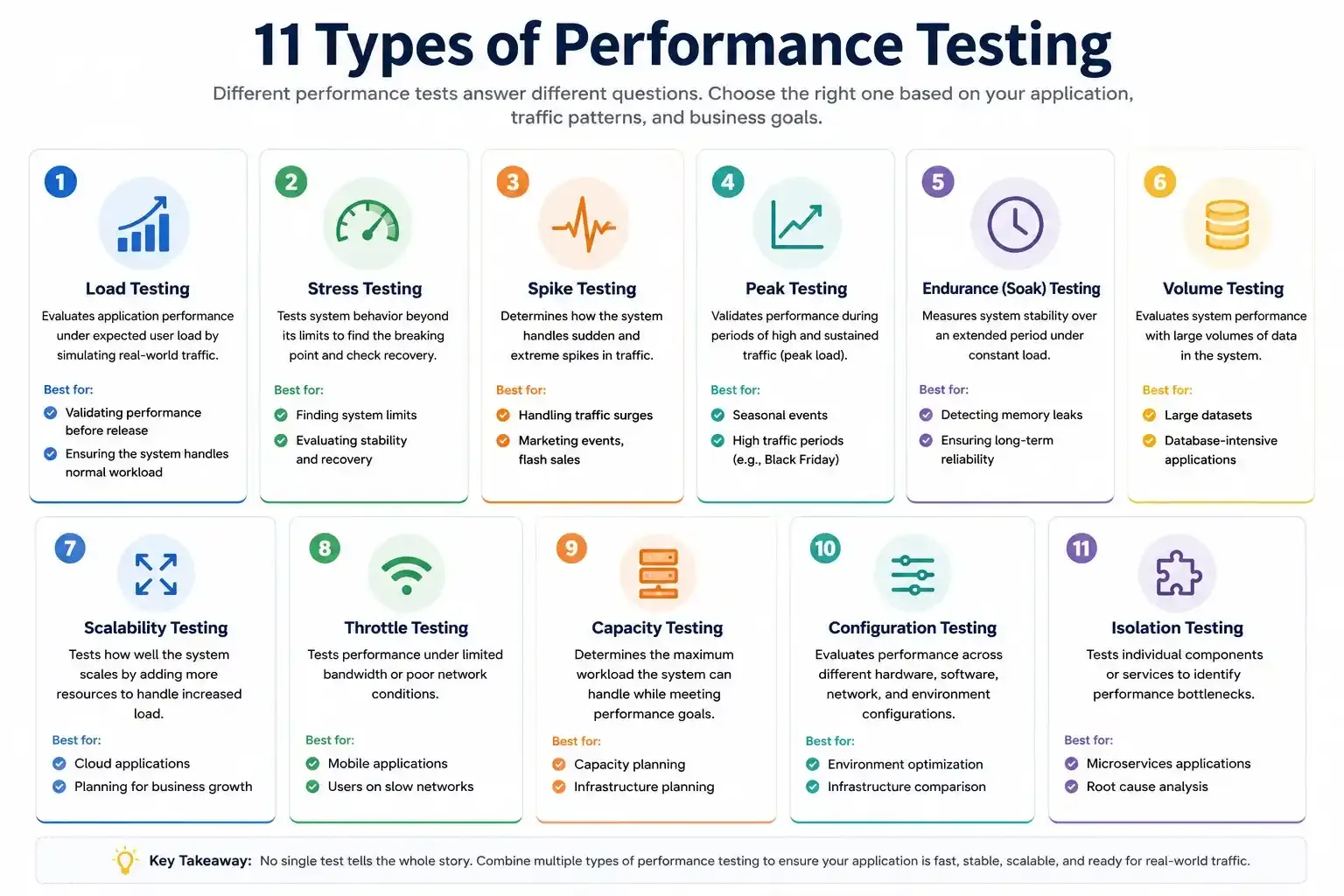
Not every application requires the same performance testing strategy.
A banking application handling millions of financial transactions has different performance requirements than an internal HR portal or a marketing website. Choosing the appropriate testing approach depends on your business goals, expected traffic patterns, application architecture, and infrastructure.
While there are many specialized testing techniques, most engineering teams rely on the following performance testing types to evaluate application readiness before production.
Let's explore each one in detail.
Load Testing
Load testing evaluates how an application performs under expected user traffic. It verifies whether the system can handle typical workloads while maintaining acceptable response times, throughput, and stability.
Think of load testing as validating your application's "business-as-usual" performance.
The objective isn't to break the application; it's to confirm that everyday operations remain fast and reliable.
When should you perform load testing?
Load testing is commonly performed:
- Before production releases
- Before marketing campaigns
- After significant application changes
- Following infrastructure upgrades
- During capacity planning
- As part of CI/CD performance validation
What metrics should you monitor during load testing?
- Average response time
- 95th percentile response time
- Throughput
- Transactions per second (TPS)
- CPU utilization
- Memory consumption
- Error rate
- Database performance
Real-world example of load testing:
A U.S.-based eCommerce retailer expects approximately 12,000 concurrent shoppers during its annual summer sale. Historical analytics show traffic peaks at around 1,800 orders per minute, and the business requires the checkout page to load in under two seconds with an error rate below 0.5%.
Before the campaign launches, the QA team executes a load test that simulates realistic customer journeys, including browsing products, searching inventory, adding items to the cart, applying discount coupons, and completing purchases.
The test validates that the platform can sustain 1,800 transactions per minute while maintaining a 95th percentile response time below two seconds and zero payment failures under expected traffic.
Although these terms are often used interchangeably, load testing is only one category of performance testing. If you're unsure how it differs from other testing approaches, read our guide on Performance vs. Load vs. Stress Testing to understand when each method should be used.
Stress Testing
Stress testing evaluates how an application behaves when pushed beyond its expected operating capacity. Unlike load testing, which validates normal business traffic, stress testing deliberately overloads the system to identify its breaking point, observe failure behavior, and measure recovery time.
The objective isn't to prevent failures; it's to understand how the application fails and whether it can recover gracefully without data loss or prolonged downtime.
When should you perform stress testing?
Stress testing is particularly valuable when:
- Preparing for product launches
- Validating disaster recovery plans
- Testing auto-scaling policies
- Evaluating infrastructure limits
- Identifying application bottlenecks
- Planning future capacity upgrades
Key metrics to monitor Stress testing
- Failure threshold
- Response time degradation
- Error rate
- CPU and memory utilization
- Database connection pool usage
- Recovery time
- Infrastructure scaling behavior
Real-world example of stress testing
A digital ticketing platform is designed to support 20,000 concurrent users, but engineers want to understand its behavior during extreme demand. During stress testing, virtual users gradually increased from 20,000 to 45,000 over 30 minutes.
At approximately 36,000 concurrent users, API response times exceed six seconds, database CPU reaches 98% utilization, and failed login requests increase above 8%.
After traffic decreases, the application recovers within three minutes, confirming that automatic recovery mechanisms function correctly.
Spike Testing
Spike testing evaluates how an application responds to sudden and extreme increases or decreases in user traffic over a short period.
Unlike load testing, where traffic increases gradually, spike testing simulates unexpected events that cause an immediate surge in demand.
These situations commonly occur during:
- Flash sales
- Viral social media campaigns
- Breaking news
- Ticket launches
- Product releases
- Limited-time promotions
A successful spike test verifies that the application remains responsive, scales appropriately, and returns to normal operation once traffic subsides.
Why is spike testing important?
Modern cloud-native applications often rely on automatic scaling. While auto-scaling can add resources dynamically, it isn't always instantaneous. Spike testing validates whether scaling policies react quickly enough to prevent service degradation.
Key metrics to monitor Spike Testing
- Auto-scaling response time
- Request failures
- Server utilization
- Recovery time
- Queue length
- API response time
Real-world example
A streaming platform like JioHotstar expects approximately 80,000 active viewers, but immediately after a championship match begins, traffic suddenly jumps to 240,000 users within 90 seconds.
Engineers perform spike testing to verify that auto-scaling provisions in additional application instances before response times exceed three seconds. The test also confirms that authentication services and CDN resources continue operating without failures during the sudden traffic increase.
Peak Testing
Although often confused with stress testing, peak testing evaluates application performance during anticipated periods of sustained high traffic rather than traffic beyond expected limits.
Peak testing simulates scenarios where the application operates close to its maximum expected capacity for an extended period.
Typical examples include:
- Black Friday sales
- Cyber Monday
- Tax filing deadlines
- Holiday travel bookings
- Banking salary credit days
Unlike stress testing, the goal isn't to break the system. Instead, it's to verify that the application consistently delivers acceptable performance during its busiest business periods.
Key metrics to measure peak testing
- Average response time
- Throughput
- Resource utilization
- Error rate
- Database performance
Real-world example of peak testing
An online retailer expects 150,000 visitors during Black Friday between 8:00 AM and 11:00 AM, nearly four times its average daily traffic.
Peak testing maintains this workload continuously for three hours to validate that checkout; inventory synchronization, payment processing, and order confirmation services remain stable throughout the busiest shopping period.
Endurance (Soak) Testing
Endurance testing, also known as soak testing, measures how well an application performs during prolonged periods of continuous operation.
While load testing typically lasts minutes or hours, endurance testing often runs for eight hours, twenty-four hours, or even several days.
Long-running tests help identify issues that short performance tests often miss, including:
- Memory leaks
- Database connection leaks
- Gradual performance degradation
- Thread exhaustion
- Log file growth
- Resource accumulation
Applications that run continuously, such as SaaS platforms, healthcare systems, banking applications, and enterprise software, benefit significantly from endurance testing.
Why is endurance testing important?
Some performance issues don't appear immediately. Instead, they develop gradually as resources accumulate over time.
Endurance testing verifies that the application remains stable throughout extended periods of normal business activity.
Real-world example of endurance testing
A SaaS project management platform serves approximately 60,000 daily users across multiple time zones. Since customers access the platform around the clock, engineers execute a 72-hour endurance test using 5,000 concurrent users.
During the test, they monitor memory utilization, thread counts, garbage collection, and database connection pools to detect gradual resource leaks that could impact long-term stability.
Volume Testing
Volume testing evaluates application performance when processing, storing, or retrieving large volumes of data.
Unlike load testing, which focuses on user traffic, volume testing concentrates on data size.
Typical scenarios include the following:
- Millions of customer records
- Large database tables
- High-volume transaction histories
- Massive file uploads
- Enterprise reporting systems
The objective is to determine whether increased data volume impacts response times, query performance, storage efficiency, or overall application stability.
Key metrics to measure volume testing
- Database response time
- Query execution time
- Storage utilization
- Index performance
- Data retrieval speed
Real-world example of volume testing
A healthcare analytics platform stores more than 120 million patient records and generates approximately 3 million new records every month.
Engineers execute volume testing using a production-sized database to verify that patient searches continue returning results within two seconds, even as database size continues growing.
Scalability Testing
Scalability testing measures how efficiently an application adapts as user traffic, workload, or infrastructure resources increase.
Rather than identifying breaking points, scalability testing evaluates sustainable growth.
Scalability testing helps organizations plan future infrastructure investments while ensuring consistent application performance.
Why is scalability testing important?
Applications rarely remain static.
As businesses grow, user demand increases. Scalability testing confirms that the application architecture can support future growth without requiring major redesigns.
Real-world example of scalability testing
A B2B SaaS provider expects its customer base to increase from 15,000 to 150,000 users within the next 18 months.
Engineers gradually increase traffic while scaling Kubernetes pods from 8 to 40 instances. The objective is to confirm that throughput increases proportionally while API response times remain below 500 milliseconds and infrastructure costs stay within budget.
Throttle Testing
Throttle testing evaluates application performance under limited bandwidth, increased latency, or poor network conditions.
Not every user accesses your application through high-speed internet. Mobile users, remote workers, and customers in regions with limited connectivity often experience slower networks.
Throttle testing helps teams understand how the application behaves under these realistic conditions.
Typical network simulations include:
- 3G
- 4G
- High-latency satellite connections
- Limited bandwidth
- Packet loss
What does throttle testing help identify?
- Slow-loading pages
- API timeout issues
- Mobile performance problems
- Network bottlenecks
- Poor user experience on slower connections
Real-world example of throttle testing
A mobile banking application serves customers across urban and rural regions where internet quality varies significantly.
Engineers simulate 3G connections (1 Mbps), 4G networks (20 Mbps), and 200 ms latency to verify that account balances load within four seconds and money transfers complete successfully despite slower network conditions.
Capacity Testing
Capacity testing determines the maximum workload an application can support while still meeting predefined performance objectives.
While stress testing intentionally pushes systems until they fail, capacity testing identifies the safe operating limit before degradation begins.
This information helps organizations make informed infrastructure planning decisions.
Capacity testing supports:
- Capacity planning
- Infrastructure budgeting
- Cloud cost optimization
- Hardware procurement
- Future growth forecasting
Real-world example of capacity testing
An online learning platform expects enrollment to grow from 50,000 to 250,000 active students before the next academic year.
Capacity testing determines that the existing infrastructure can safely support 180,000 concurrent users before response times exceed the organization's SLA of two seconds, allowing the infrastructure team to plan upgrades well before peak enrollment.
Configuration Testing
Configuration testing measures application performance across different hardware, software, browser, operating system, database, and cloud configurations.
The goal is to determine which configuration delivers the best performance and identify environments that introduce bottlenecks.
Configuration testing is particularly useful when:
- Migrating cloud providers
- Upgrading databases
- Testing new server configurations
- Comparing container resource allocations
Real-world example of configuration testing
Before migrating to a new cloud environment, engineers compare four infrastructure configurations:
- PostgreSQL 14 vs PostgreSQL 16
- 8 vCPU vs 16 vCPU application servers
- SSD vs NVMe storage
- Different JVM memory settings
Testing reveals that upgrading the database and increasing application memory reduces average API response times by 32% without increasing infrastructure costs.
Isolation Testing
Isolation testing identifies performance bottlenecks by testing individual application components separately rather than evaluating the entire system at once.
Instead of testing the complete application, engineers isolate services such as:
- Authentication APIs
- Payment gateways
- Database queries
- Search services
- Microservices
- Messaging systems
Testing individual components simplifies root cause analysis and accelerates performance optimization.
Why is isolation testing valuable?
Modern applications often consist of dozens, or even hundreds, of interconnected microservices. Testing each component independently helps engineering teams quickly identify the exact service responsible for performance degradation.
Real-world example of isolation testing
A retail application's checkout page takes nearly seven seconds to load during peak traffic.
Rather than testing the entire application, engineers isolate the authentication API, product catalog service, payment gateway, inventory service, and recommendation engine.
Isolation testing reveals that 82% of the total response time is spent waiting for inventory validation. Optimizing this single service reduces overall checkout latency from 7.1 seconds to 2.3 seconds.
Which Type of Performance Testing Should You Choose?
With multiple types of performance testing available, one of the most common questions engineering teams ask is:
"Which performance test is right for my application?"
The answer depends on what you're trying to validate. Each testing type focuses on a different aspect of application performance, and selecting the wrong one can lead to incomplete results or overlooked bottlenecks.
The table below provides a quick reference for choosing the most appropriate performance test based on your testing objective.
| If You Want To... | Use This Testing Type | Primary Goal |
|---|---|---|
| Validate normal business traffic | Load Testing | Verify expected performance under typical workloads |
| Find the application's breaking point | Stress Testing | Determine maximum system capacity and recovery behavior |
| Test sudden traffic surges | Spike Testing | Evaluate system resilience during unexpected traffic increases |
| Simulate predictable high-demand periods | Peak Testing | Validate stability during anticipated traffic peaks |
| Detect memory leaks and resource degradation | Endurance (Soak) Testing | Measure long-term stability |
| Evaluate performance with large datasets | Volume Testing | Verify efficient data processing and storage |
| Plan future business growth | Scalability Testing | Confirm the application scales efficiently |
| Test slow or unstable network conditions | Throttle Testing | Improve user experience across different network speeds |
| Determine maximum supported workload | Capacity Testing | Identify safe operating limits |
| Compare different environments or infrastructure | Configuration Testing | Optimize system configuration |
| Isolate performance bottlenecks | Isolation Testing | Troubleshoot individual application components |
While many organizations begin with load testing, mature engineering teams typically combine several testing approaches throughout the software development lifecycle to gain a complete understanding of application performance.
Need Help Estimating Your Test Workload?
Once you've selected the right performance testing approach, the next step is determining how many virtual users, requests per second, and load generators your test requires. Our free Performance Testing Calculators help QA engineers and performance testers estimate testing parameters in minutes.
Try the Performance Testing CalculatorsHow Do Different Types of Performance Testing Compare?
Although these testing techniques often overlap, each one answers a different engineering question.
| Testing Type | Primary Focus | Typical Duration | Traffic Pattern | Best Used For |
|---|---|---|---|---|
| Load Testing | Expected workload | Short to medium | Gradual | Release validation |
| Stress Testing | Beyond system limits | Short | Increasing beyond capacity | Capacity planning |
| Spike Testing | Sudden traffic changes | Short | Instant surge | Viral campaigns and flash sales |
| Peak Testing | Expected maximum load | Medium | Sustained high traffic | Seasonal events |
| Endurance Testing | Long-term stability | Several hours or days | Constant | Detecting memory leaks |
| Volume Testing | Large datasets | Medium | Normal traffic with massive data | Database-intensive systems |
| Scalability Testing | Infrastructure growth | Medium | Gradually increasing | Cloud-native applications |
| Throttle Testing | Slow network conditions | Medium | Limited bandwidth | Mobile applications |
| Capacity Testing | Maximum sustainable workload | Medium | Increasing load | Infrastructure planning |
| Configuration Testing | Environment optimization | Medium | Controlled | Performance tuning |
| Isolation Testing | Individual component analysis | Short | Component-specific | Root cause analysis |
No single performance test can answer every performance-related question. Selecting the appropriate testing type depends on your application's architecture, business objectives, expected user behavior, and infrastructure design.
What Does a Typical Performance Testing Workflow Look Like?
High-performing engineering teams rarely execute performance testing as a one-time activity before production. Instead, they integrate it throughout the software development lifecycle.
A modern performance testing workflow typically follows these steps:
- Define Performance Objectives
- Create Realistic Test Scenarios
- Prepare a Production-Like Environment
- Execute Different Performance Tests
- Analyze Performance Metrics
- Optimize and Retest
What Are the Three Pillars of Effective Performance Testing?
Successful performance testing extends beyond measuring response times. Engineering teams should evaluate applications using three core pillars that together define overall system performance.
1. Speed
Speed measures how quickly an application responds to user requests.
Common speed metrics include:
- Response time
- Latency
- Time to First Byte (TTFB)
- Page load time
- API response time
Faster applications improve customer satisfaction, conversion rates, and user retention.
2. Scalability
Scalability measures how efficiently an application adapts as demand increases.
Rather than asking whether the system works today, scalability answers whether it can continue supporting future business growth.
Engineering teams evaluate:
- Horizontal scaling
- Vertical scaling
- Auto-scaling efficiency
- Resource utilization
- Infrastructure elasticity
Cloud-native applications especially benefit from continuous scalability testing.
3. Stability
Stability measures whether an application can maintain consistent performance over time, even during prolonged usage or changing workloads.
A stable application should:
- Avoid memory leaks
- Maintain acceptable response times
- Recover gracefully after failures
- Process requests consistently
- Operate reliably during extended usage
True application performance exists where speed, scalability, and stability intersect.
What Are the Most Common Performance Testing Mistakes?
Even experienced engineering teams occasionally make performance testing mistakes that reduce the value of their results.
Avoid these common pitfalls:
Testing Too Late
Waiting until just before production leaves little time to resolve performance bottlenecks. Integrate performance testing throughout development.
Using Unrealistic Test Data
Synthetic or repetitive data rarely reflects production behavior.
Use realistic datasets, transaction volumes, and user journeys whenever possible.
Ignoring Backend Metrics
Response time alone doesn't explain why an application slows down.
Always monitor:
- CPU
- Memory
- Database performance
- Network traffic
- Disk I/O
- Container health
Testing Only Normal Traffic
Applications often fail during unusual conditions rather than everyday usage.
Include spike, stress, and endurance testing in your overall testing strategy.
Not Defining Success Criteria
Without measurable performance objectives, teams cannot determine whether an application actually meets business expectations.
Define Service Level Objectives (SLOs), Service Level Agreements (SLAs), and acceptable performance thresholds before executing any test.
Engineering Insight: The most effective performance testing strategies combine multiple testing types, realistic workloads, production-like environments, and continuous monitoring to provide a complete picture of application performance, not just isolated benchmark numbers.
Which Performance Testing Tools Should You Consider?
The right performance testing tool depends on your application architecture, protocols, scalability requirements, and CI/CD pipeline. While no single tool is ideal for every scenario, the following tools are among the most widely adopted by QA and engineering teams.
| Tool | Best For | Key Strengths |
|---|---|---|
| Apache JMeter | Web, API, Database Testing | Open-source, extensive protocol support, strong community |
| k6 | API & Developer-Centric Testing | JavaScript scripting, CI/CD integration, cloud-ready |
| Gatling | High-Performance Load Testing | Scala-based, lightweight, detailed reporting |
| Locust | Python Applications | Python scripting, distributed execution |
| BlazeMeter | Enterprise Load Testing | Cloud scalability, JMeter compatibility |
| NeoLoad | Enterprise Applications | Low-code scripting, SAP and enterprise support |
| Azure Load Testing | Azure Workloads | Native Azure integration and cloud scalability |
| LoadRunner Professional | Large Enterprise Systems | Advanced protocol coverage and enterprise reporting |
When selecting a tool, consider:
- Supported protocols (HTTP, HTTPS, WebSocket, gRPC, MQTT, etc.)
- Ease of scripting and maintenance
- CI/CD integration capabilities
- Cloud execution support
- Distributed load generation
- Reporting and analytics
- Licensing costs
- Team expertise
After executing your tests, generate detailed dashboards using HTML reports in JMeter.
Remember that tools execute tests, but strategy determines success. A well-designed test plan often delivers greater value than simply choosing the most advanced tool.
What Are the Best Practices for Performance Testing?
Effective performance testing goes beyond generating virtual users. It requires realistic planning, meaningful metrics, and continuous optimization. The following best practices help teams produce reliable and actionable results.
Define Clear Performance Goals
Every performance test should begin with measurable objectives.
Examples include:
- API response time below 500 milliseconds
- Checkout completion within two seconds
- Support for 20,000 concurrent users
- Less than 0.5% error rate during peak traffic
Without defined success criteria, interpreting test results becomes subjective.
Test in a Production-Like Environment
Development environments rarely reflect production infrastructure.
Whenever possible, align your testing environment with production by matching:
- Server specifications
- Network configuration
- Databases
- Caching layers
- Security controls
- Third-party integrations
The closer your test environment mirrors production, the more reliable your findings.
Simulate Real User Behavior
Avoid generating unrealistic traffic patterns.
Instead, simulate authentic user journeys, such as:
- Logging in
- Searching for products
- Browsing dashboards
- Completing purchases
- Uploading files
- Calling APIs
Realistic scenarios produce insights that synthetic traffic often misses.
Monitor the Entire Technology Stack
Application response time is only one part of the picture.
Collect infrastructure metrics alongside application metrics, including:
- CPU utilization
- Memory consumption
- Garbage collection activity
- Database query performance
- Network latency
- Disk I/O
- Container health
- Auto-scaling events
This holistic view makes it easier to identify the true source of bottlenecks.
Integrate Performance Testing into CI/CD
Performance testing should not be reserved for major releases.
Automating baseline load tests within your CI/CD pipeline enables teams to detect regressions early and prevent performance issues from reaching production.
Continuous performance testing supports faster releases while maintaining application reliability.
Review Trends, Not Just Individual Results
Performance often degrades gradually rather than failing suddenly.
Track trends over multiple test runs to identify:
- Increasing response times
- Growing memory usage
- Higher infrastructure costs
- Declining throughput
- Rising error rates
Historical analysis helps engineering teams make proactive optimization decisions.
PrimeQA Success Story: Validating 1 Million API Requests in One Hour
Real-world performance testing often involves much more than generating virtual users. Engineering teams must also optimize test scripts, manage authentication tokens, prepare realistic test data, and ensure the testing infrastructure can scale reliably.
In one of our recent performance testing engagements, PrimeQA partnered with a North American technology company to validate whether its APIs could sustain 1 million requests within a single hour under production-like conditions.
To achieve this, our engineers:
- Converted Postman collections into optimized JMeter test scripts.
- Implemented dynamic authentication token correlation.
- Simulated realistic API traffic patterns.
- Replaced CSV datasets with optimized TXT-based test data.
- Executed distributed load tests using AWS-powered RedLine13 infrastructure.
The outcome demonstrated that the platform could successfully process over one million API requests, sustain 258 requests per second, reduce CPU utilization by 45%, and complete the test with zero performance failures.
This project illustrates an important lesson: successful performance testing isn't just about generating load, it's about creating realistic test scenarios, identifying infrastructure bottlenecks, and validating application stability before production deployment.
Conclusion
Performance testing is more than a final checkpoint before production; it's an ongoing engineering practice that helps organizations deliver faster, more reliable, and more scalable applications.
Each type of performance testing serves a unique purpose. While load testing verifies expected workloads, stress testing reveals system limits; spike testing evaluates sudden traffic surges, endurance testing uncovers long-term stability issues, and scalability testing prepares applications for future growth.
Rather than relying on a single testing approach, successful engineering teams combine multiple performance testing techniques throughout the software development lifecycle. This comprehensive strategy provides greater confidence that applications can meet user expectations under both normal and exceptional conditions.
As modern applications continue to evolve, performance testing remains one of the most effective ways to reduce production risks, optimize infrastructure investments, and deliver exceptional user experiences.
Whether you're preparing a product launch, validating cloud infrastructure, or optimizing enterprise applications, choosing the right performance testing strategy today can prevent costly performance failures tomorrow.